Instruções para executar seus próprios snippets de código em uma ação de bot
Requisitos de escopo
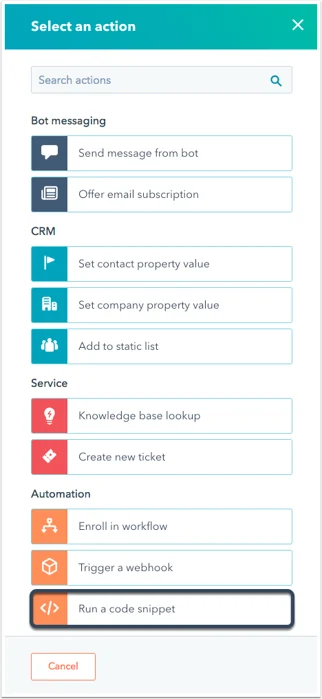
Ao criar ou editar um bot, você pode adicionar um snippet de código se clicar no “+” para adicionar uma ação como normalmente faria. No painel de seleção de ação, clique em “Executar um snippet de código”.
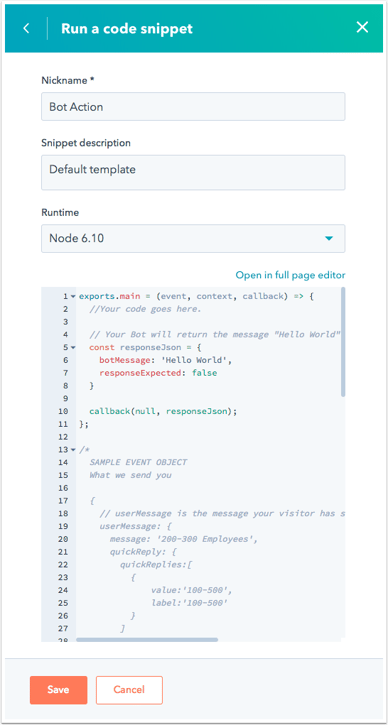
Em seguida, crie um apelido à sua ação. No painel de edição de código, você verá nosso modelo padrão para Node.js 10.x. Os detalhes do objeto “evento” e possíveis formatos de objeto de resposta são detalhados abaixo.
O código será acionado quando a ação salva for atingida em uma conversa.Ao trabalhar com snippets de código, você deve pensar em 3 considerações:
A função exports.main() é chamada quando a ação de snippet de código é executada.
O argumento event é um objeto que contém detalhes do visitante e sessão de chat.
A função callback() é usada para passar dados de volta ao bot e ao usuário. Ela deve ser chamada na função exports.main.
O objeto event conterá os seguintes dados:
Reportar código incorreto
Copiar
Perguntar à IA
//example payload{ "userMessage": { // Details for the last message sent to your bot "message": "100-500", // The last message received by your bot, sent by the visitor "quickReply": { // If the visitor selected any quick reply options, this will be a list of the selected options. // Will be 'null' if no options were selected. "quickReplies":[ // A list of quick reply options selected by the visitor { "value":"100-500", "label":"100-500" } ], }, "session": { "vid": 12345, // The contact VID of the visitor, if known. "properties": { // A list of properties collected by the bot in the current session. "CONTACT": { "firstname": { "value": "John", "syncedAt": 1534362540592 }, "email": { "value": "testing@domain.com", "syncedAt": 1534362541764 }, "lastname": { "value": "Smith", "syncedAt": 1534362540592 } } }, "customState":{myCustomCounter: 1, myCustomString:"someString"} // Only present if it customState was passed in from a previous callback payload }}
A função callback() é usada para enviar dados de volta ao bot. O argumento deve ser um objeto com os seguintes dados:
Reportar código incorreto
Copiar
Perguntar à IA
//sample payload{ "botMessage": "Thanks for checking out our website!", // This is the message your bot will display to the visitor. "quickReplies": [{ value:'option', // Passed to the bot as the response on click label:'Option' // Gets displayed as the button label }], // the quickReplies object is optional "nextModuleNickname": "SuggestAwesomeProduct", // The nickname of the next module the bot should execute. If undefined, the bot will follow the default configured behavior "responseExpected": false // If true, the bot will display the returned botMessage, wait for a response, then execute this code snippet again with that new response. "customState":{myCustomCounter: 1, myCustomString:"someString"} // Optional field to pass along to the next step.}
Os snippets de código nos bots devem terminar a execução em até 20 segundos e usar apenas 128 MB de memória. Ultrapassar esses limites resultará em um erro.